CVWiser blog
CVWiser Chrome Extension: Capture a Job Posting, See Your Match, Tailor Your CV
Most job Chrome extensions bookmark roles or autofill forms. CVWiser’s extension captures the job description, shows a match score against your real profile, then opens a tailored CV + cover letter package without inventing skills.
Capture a job posting in Chrome, check your match score, and tailor a CV + cover letter from your real profile without autofill spam or invented skills.
If you are searching for a chrome extension to capture a job description and turn it into a tailored resume, you are usually stuck between two extremes. Tracker extensions bookmark the role and leave you to rewrite documents later. Autofill and auto-apply tools race through forms. Neither solves the real bottleneck for careful applicants: getting an honest, job-aligned CV and cover letter before you submit.
That is the gap the CVWiser Chrome extension is built for. You open a posting on LinkedIn, Indeed, Greenhouse, Lever, or a company career page, click Capture, review the fields, see a match score against your saved profile, then open CVWiser to generate a per-job application package. No background scraping. No invented skills.
What do job search Chrome extensions actually do?
Not all “job” extensions solve the same problem. If you pick the wrong category, you will blame the tool for a job it was never designed to do.
| Extension type | What it’s good at | Where it stops |
|---|---|---|
| Job tracker / bookmark | Saving roles, pipeline stages, notes | You still tailor documents elsewhere |
| Autofill / auto-apply | Filling Workday, Greenhouse, LinkedIn forms fast | Quality and honesty can slip under volume |
| ATS keyword scanners | Highlighting missing terms | Often separate from capture + package workflow |
| Capture → match → tailor | Pulling the JD once, scoring fit, generating CV + letter | Not a form autofiller |
Teal’s Chrome companion is a strong example of the tracker lane: save jobs from many boards into a dashboard. Huntr and similar tools lean into tracking plus autofill. Auto-apply tools chase volume. Jobscan-style products go deep on keyword match, usually in a web app rather than as a capture-first browser workflow.
CVWiser sits in the fourth lane on purpose. The extension’s job is to capture the posting cleanly, show whether your profile is even close, then hand you into a workspace where CV and cover letter stay consistent.
How the CVWiser Chrome extension works
The flow matches what you see on the extension page: capture → match → decide → package.
- Open a job posting on LinkedIn (best supported), Indeed, Greenhouse, Lever, or most career pages.
- Capture from this tab. Nothing runs until you click Capture. The extension pulls title, company, URL, and job description.
- Review and edit fields if the extractor missed anything.
- See eligibility warnings (when location, work authorization, timezone, or languages are on your profile) above your match score. Warnings are advisory and never block package creation (eligibility check).
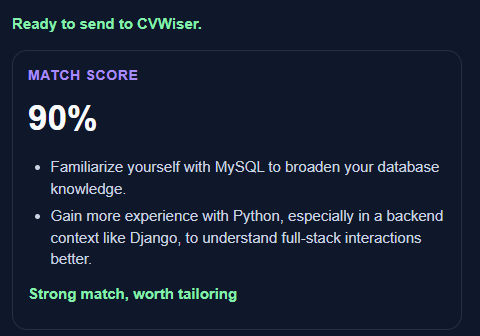
- See your match score (and gap notes) against your master profile while you are still on the job page, before you spend a generation.
- Decide: skip a weak fit, or choose Open in CVWiser / Create application package. Optionally keep Track this application on.
- Tailor and export in CVWiser: CV + cover letter, consistency checks, PDF/DOCX, then submit on the employer site.
The extension is included on Free, PAYG, and Pro at no extra cost. Generating packages uses your normal monthly or PAYG quota, same as starting from the package editor.
For install steps and the live product walkthrough, see the CVWiser Chrome extension page.
See your match score before you open CVWiser (so you don’t waste a package)
This is the feature most “job” extensions skip, and it is the main reason to install CVWiser’s.
After Capture, the extension shows a match score against your master profile while you are still on the job page before you click Open in CVWiser or create an application package. You also get short gap notes (skills or experience the posting wants that your profile is light on) and a plain-language cue such as “Strong match, worth tailoring.” When your profile includes eligibility fields, you may also see advisory eligibility warnings above that score for location, work authorization, language, timezone, or years of experience (eligibility check). Those warnings are separate from match percentage and never block generate.
That order matters:
- Capture the posting.
- Read the score and gaps in the extension.
- Decide whether the role is worth a tailored package.
- Only then open CVWiser and generate.
If the score is weak, you can walk away without burning a generation credit, without rewriting a CV for a bad fit, and without adding noise to your tracker. Tracker-only extensions save the job either way. Autofill tools push you toward applying either way. A pre-decision match score is a filter: it protects your time and your monthly package quota.
Use it as a go / no-go rule. High score and gaps you can honestly close with reframing → open and tailor. Low score and hard requirements you cannot evidence → skip or bookmark for later, but do not generate yet.
Why capture-first beats copy-paste (and why privacy matters)
High-volume applicants fail in boring ways: they lose the original posting text, tailor against a half-copied JD, or apply twice with different document versions of the same role. Capturing the posting into a structured record fixes the first failure mode. Pairing that capture with a profile-based match score fixes the second: you stop generating packages for roles you are clearly not close to.
Privacy is part of the product promise, not a footnote. CVWiser’s extension reads the page only when you click Capture. It is designed to pull job title, company, page URL, and job description not to run silently in the background. That matters if you are comparing tools that request broad browsing permissions “just in case.”
If you care about what happens after capture keyword targeting, honesty constraints, and package quality the breakdown in how to tailor a CV to a job description and best ATS resume tools covers the web-app side of the same workflow.
Capture → match → package: the workflow that holds up after 20 applications
A useful Chrome extension for job applications should reduce tab chaos without lowering standards. Here is the operating loop we recommend:
- Build or import your master profile once (LinkedIn export or CV upload).
- Browse roles normally on LinkedIn or career sites.
- Capture each serious posting into CVWiser with one click.
- Use the match score as a go / no-go before generating.
- Generate the package: tailored CV, cover letter, ATS breakdown.
- Run the CV–cover letter consistency check.
- Export PDF and DOCX, submit on the employer site, then log status and follow-up.
That loop is the opposite of spray-and-pray autofill. It is closer to the “quality with a system” approach in quality vs quantity job applications: fewer wasted generations, clearer evidence of what you sent, and less version confusion.
When CVWiser’s extension is the right fit (and when it isn’t)
Choose CVWiser’s Chrome extension if:
- Your bottleneck is tailoring CV + cover letter per role, not filling forms.
- You want a match signal before you generate.
- You care that the AI reframes real experience instead of inventing skills.
- You want capture, package, consistency check, exports, and tracking in one product family.
Choose (or pair) something else if:
- You mainly need a kanban job tracker across dozens of boards (Teal/Huntr-style tools excel here). For a deeper take on Teal’s strengths and gaps, see Teal AI Resume Builder: fit, gaps, and best use cases.
- Your main pain is autofilling the same Workday fields fifty times use a dedicated autofill extension alongside CVWiser, not instead of honest tailoring.
- You want bulk auto-apply with minimal review. That is a different strategy, and it conflicts with CVWiser’s “never invent skills” positioning.
Many serious applicants end up with two tools: one for capture/tailor quality, one for form speed. That is fine. The mistake is expecting one Chrome icon to do every job well.
Frequently Asked Questions
Which sites work?
LinkedIn works best. Most career pages work via a generic extractor (Indeed, Greenhouse, Lever, and many company sites). You can always edit fields before you open CVWiser or create a package.
What does the CVWiser Chrome extension capture?
Only when you click Capture: job title, company, page URL, and job description. Nothing runs in the background.
Can I see a match score before I generate a package?
Yes. After Capture, the extension shows your match score and gap notes on the job page before Open in CVWiser or Create application package. Skip poor-fit roles without wasting a generation credit. Still run a format checklist on the export so Easy Apply and company ATS can parse the file. The full Easy Apply loop (tailor first, then click) is in LinkedIn Easy Apply without spray-and-pray. If the employer uses Workday, check the parsed profile using Workday resume format. For Greenhouse boards, see Greenhouse resume format. For Lever career pages, see Lever resume format. For Ashby career pages, see Ashby resume format.
Is this an autofill or auto-apply extension?
No. It captures the posting, shows fit, and hands off to a tailored CV + cover letter workflow. It does not mass-submit applications for you.
Is the Chrome extension free?
Yes. It is included on Free, PAYG, and Pro. Generating application packages uses your normal plan credits.
Will it invent skills on my resume?
No. CVWiser generates from your master profile. The AI can reframe and prioritize real experience for the posting, but it is built not to invent employers, titles, or skills that are not already in your profile.
If you want the middle path between bookmarking jobs and blasting autofill—capture the JD, check the match, tailor the package—install the CVWiser Chrome extension and run one real posting end to end.