CVWiser blog
Does LinkedIn Easy Apply Go to an ATS? What Happens to Your Resume
Sometimes Easy Apply stays in LinkedIn. Sometimes your file is forwarded to Workday, Greenhouse, or Lever. Here is how to tell, what breaks on handoff, and what to do before you click.
You clicked Easy Apply, saw “Application submitted,” and assumed your resume landed in the employer’s hiring system. Sometimes it did. Sometimes it stopped inside LinkedIn. Sometimes it was forwarded to Workday, Greenhouse, or Lever, and the file that parsed is not the one you thought you sent.
Easy Apply is not “skip the ATS.” It is a delivery shortcut whose destination depends on how that employer wired the job. The workflow post covers how to apply honestly (Easy Apply without spray-and-pray). This one covers where your application goes and what still has to parse.
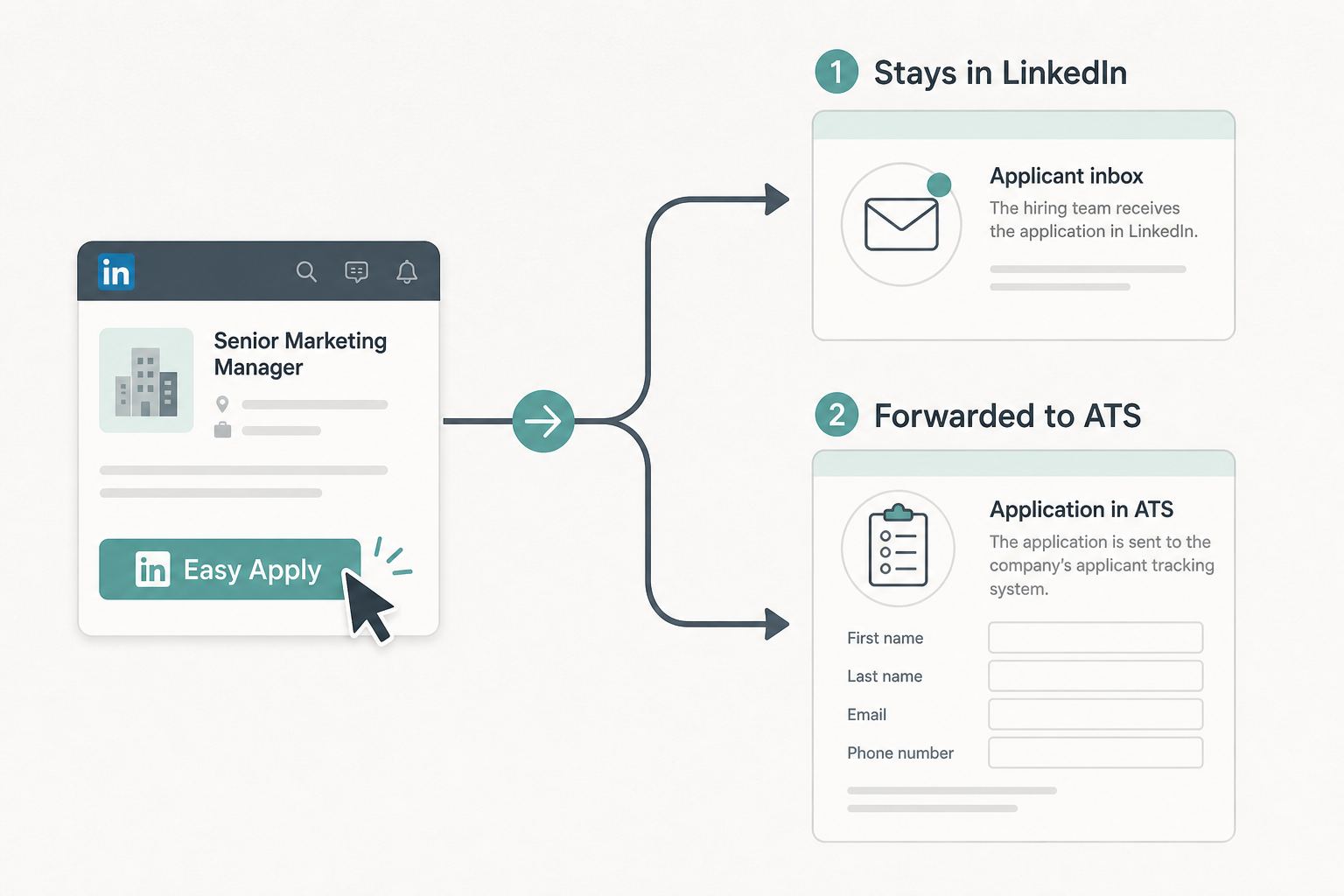
The short answer: it depends on the employer
There is no single rule for every LinkedIn job. Typical patterns:
| What you see on the posting | What usually happens |
|---|---|
| Easy Apply only (no “Apply on company website”) | Application often stays in LinkedIn Recruiter / LinkedIn’s applicant list. Your resume is attached there; a human or LinkedIn tools review it. |
| Easy Apply + “Apply on company website” | Easy Apply is optional. The authoritative apply path is often the company ATS. Some people use both. Do not assume one replaces the other. |
| Easy Apply, then redirect or email to complete | LinkedIn collects basics; the employer may still require a full ATS profile (Workday, Greenhouse, Lever, iCIMS, etc.) with upload and parsed fields. |
| Apply on company site only | No Easy Apply. You were never bypassing an ATS. Go straight to their board. |
LinkedIn does not publish a universal “this job uses Workday” label on every posting. Read the buttons and fine print. If the company site is offered, serious candidates often use it when they want control over the file and parsed fields.
When your resume does reach an ATS
If the employer integrates LinkedIn with their stack, your Easy Apply submission (or a follow-up link) can create or update a candidate record in:
- Workday: common at enterprise and universities
- Greenhouse: common at tech and growth companies
- Lever: common at startups
- Ashby: common at fast-growing modern tech companies
- iCIMS: common at large employers, staffing, and healthcare
- Taleo: common on older Oracle enterprise career portals
The ATS still runs a parser on your PDF or DOCX: employer, title, dates, contact. A high keyword score in a third-party scanner does not mean those fields mapped (keyword stuffing vs real match). Format still matters. Use the ATS resume format checklist and the copy-paste test before you click.
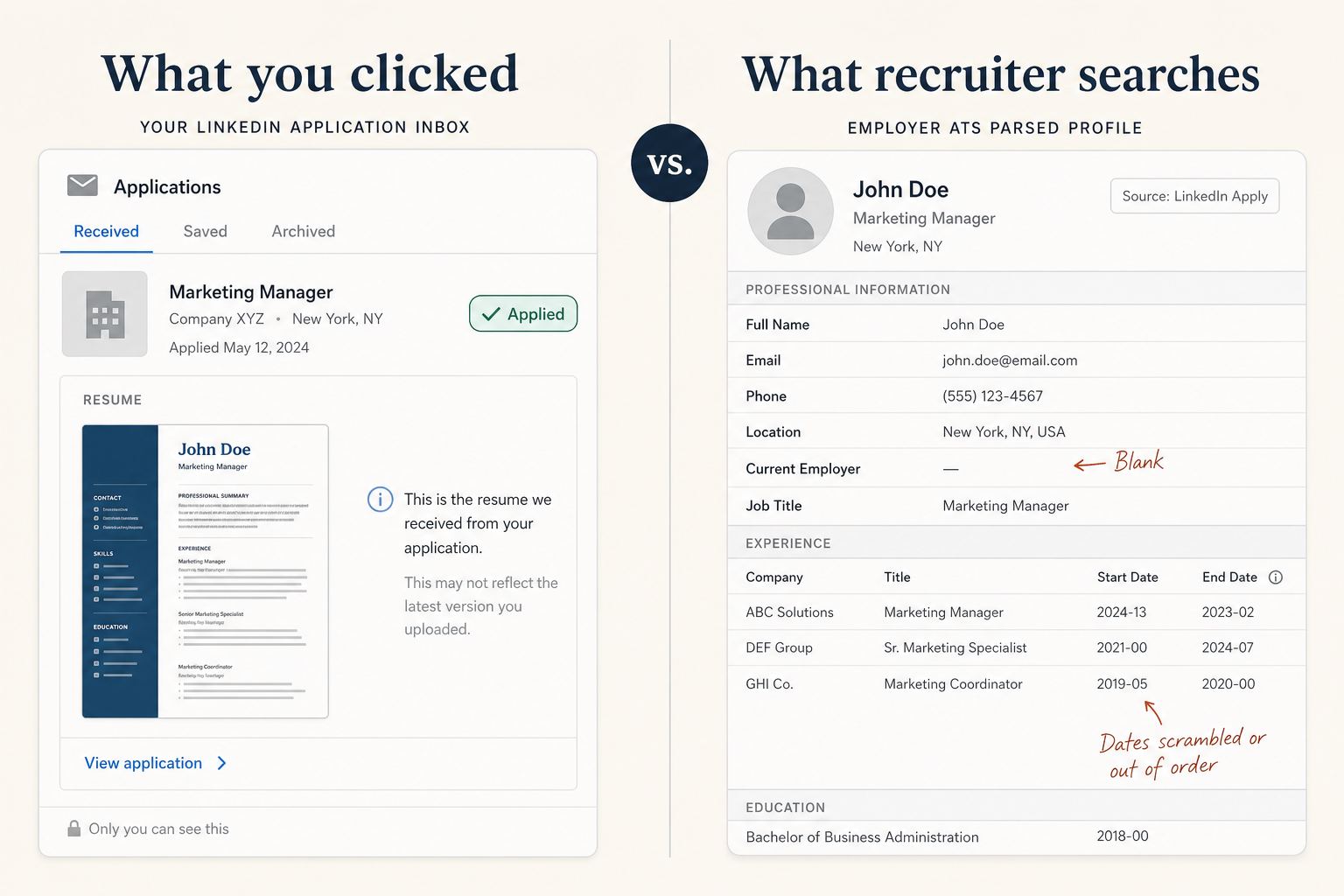
What breaks on the handoff
These show up after Easy Apply, when the file hits the employer side:
- Wrong or stale file: LinkedIn reuses your last uploaded resume unless you pick a new one for this job (Easy Apply workflow).
- Parse failure: two-column layout, icons instead of text email, tables for work history → blank or scrambled fields on Workday/Greenhouse/Lever.
- Duplicate or partial applications: Easy Apply on LinkedIn plus half-finished Workday profile.
- No letter, or a mismatched letter: optional on Easy Apply; if you add one later on the ATS, it must match the CV (consistency check).
Easy Apply did its job: it submitted something. The ATS may still fail to read it cleanly.
What to do before and after you click
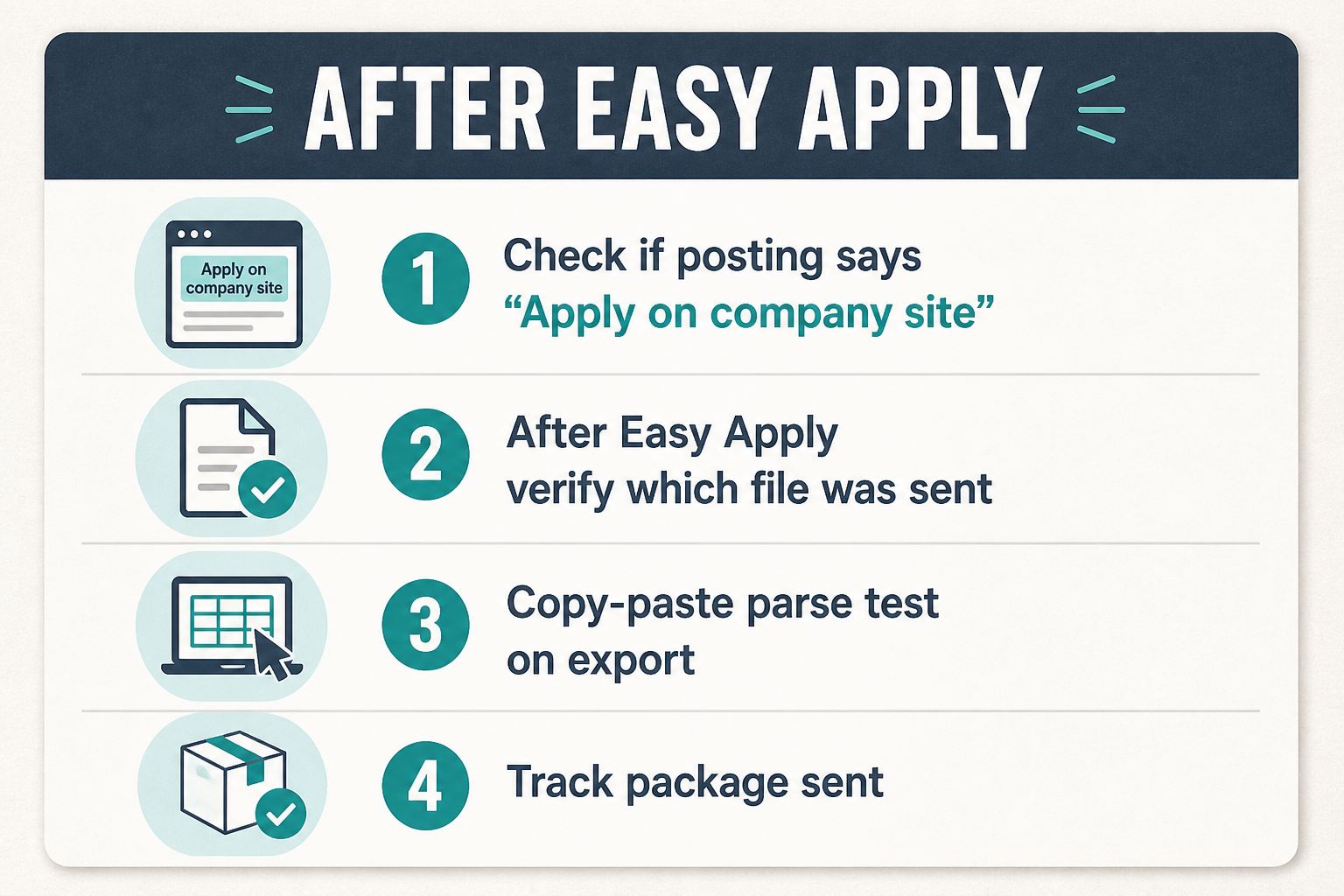
- Check the posting. If “Apply on company website” exists and you care about parse + tracking, consider the career site as primary and Easy Apply as secondary, not the other way around.
- Upload the tailored export for this job, not LinkedIn’s default from last month. Capture → match → package (extension guide); review with Trust Diff and fact-check before export.
- Run the copy-paste test on that PDF/DOCX (format checklist, PDF vs DOCX).
- After submit, if you get a link to complete an employer profile, open it and read parsed fields (Title, Company, dates). Fix what the parser got wrong.
- Track what you sent (job, date, file version) so follow-up and interview defense match the package that actually went out (quality vs quantity).
Easy Apply is not a bypass, and not the enemy
-
Myth: “Easy Apply means no ATS, so format does not matter.”
Reality: Many roles still land in an ATS or require a second step; format matters when they do. -
Myth: “Easy Apply always goes straight to the hiring manager.”
Reality: Often it goes to a queue (LinkedIn, ATS, or both), like any other apply path. -
Myth: “I should never use Easy Apply.”
Reality: It is fine as the last click after you have a defensible, parse-clean package for this role.
CVWiser does not autofill LinkedIn or employer ATS forms. Capture and match are before you spend a package credit; export is the file you choose to upload. Match is directional, not a claim that we certified your file against every employer parser (Jobscan vs CVWiser for scanner vs package tradeoffs).
Free plan: 3 application packages a month, no card. Fresh package or extension. Broader thesis: what CVWiser is really fighting.
Frequently Asked Questions
Does LinkedIn Easy Apply go to an ATS?
Sometimes yes, sometimes no. Easy Apply can stay in LinkedIn's queue or forward your file to systems like Workday, Greenhouse, or Lever. You usually cannot tell from the blue button alone.
Why does my resume look wrong after Easy Apply?
Common causes: LinkedIn reused an old upload, the layout failed parse on the employer ATS, or you still need to complete a second profile step. Open any employer link and check Title, Company, and dates.
Is Easy Apply worse than applying on the company site?
Not inherently. The company site is better when you want control over the file and parsed fields. Easy Apply is fine as the last click after you have the right package.
How do I prepare a resume for Easy Apply handoffs?
Use a single-column selectable file, run the copy-paste test, upload the tailored export for this job, then verify parsed fields if an ATS profile opens afterward.
The short version
Easy Apply sometimes stays on LinkedIn; sometimes it forwards to Workday, Greenhouse, Lever, or another ATS. You cannot tell from the blue button alone. Tailor and parse-check the file anyway, prefer the company site when it is offered and you want control, and verify parsed fields after any handoff. Speed only helps when the right resume actually arrives readable on the other side.